Storefront link
For shopsA page for your bio or a story. Customers pick what they want and send the order on WhatsApp; the same order lands on your desk with its own number before the chat opens.
Inside the Order desk
Four jobs a business buys Marsa for: getting orders in, keeping stock right, getting deliveries out on time, and getting paid sooner. Every tool below is live today, in the edition marked on it. What is planned sits under the Roadmap chip.
01
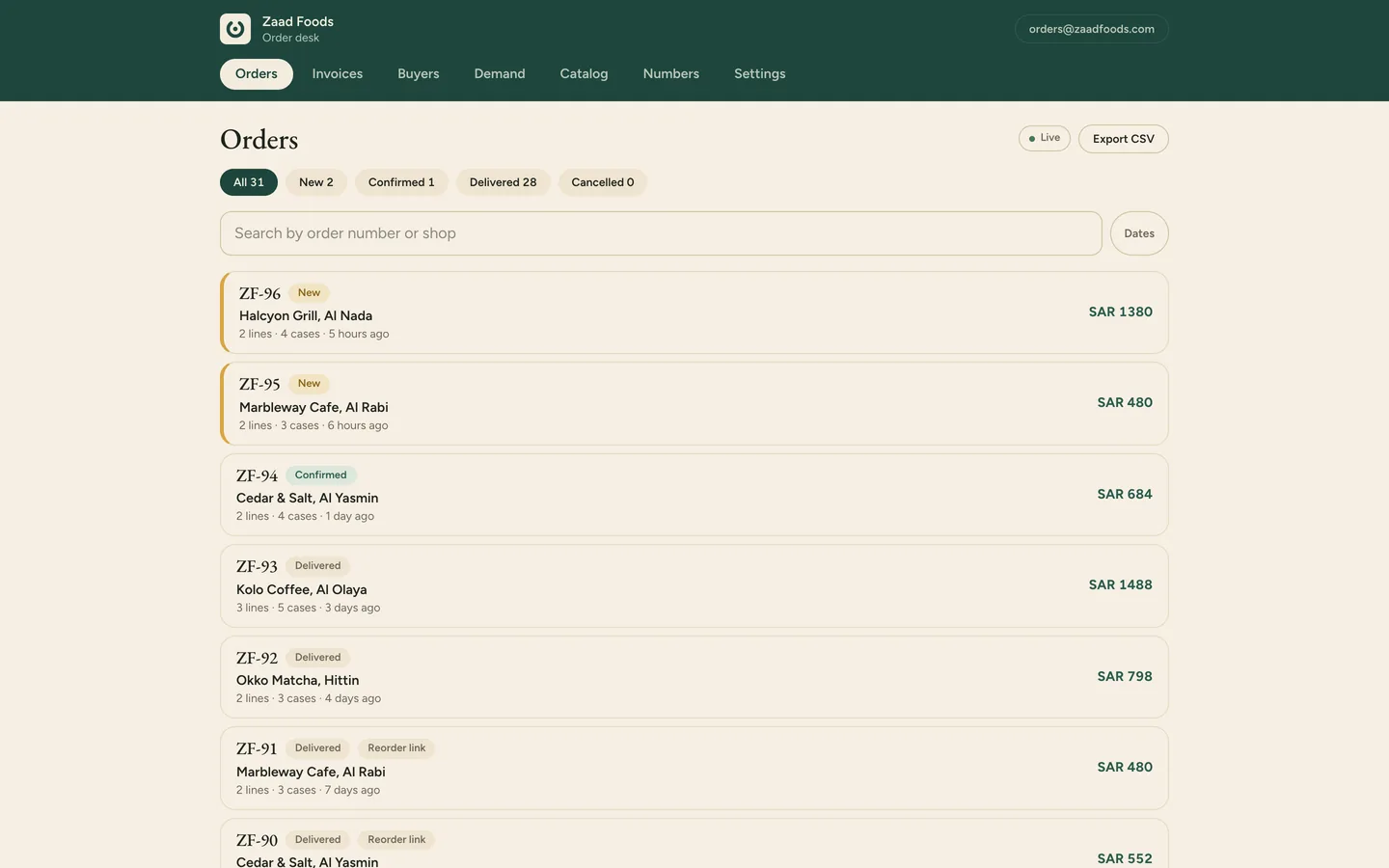
Every order arrives itemised, with a number, on one desk, so nobody retypes a voice note or a photo of a list, and nothing gets missed in a busy chat.
A page for your bio or a story. Customers pick what they want and send the order on WhatsApp; the same order lands on your desk with its own number before the chat opens.
An order that arrives as a plain WhatsApp message goes to the desk with one forward. It is read against your own catalog, logged with a number, and the customer's words stay beside it.
Your products, cases, pack sizes and minimums on one fast mobile page under your brand. Each customer gets a personal link; nothing to install.
Up to twelve named lists, each pricing some or all of the catalog, and each customer assigned to one, so a hospital and a corner pharmacy each see their own prices from their own link. Or hide prices and show them on the delivery note.
Every order in one live list with its channel and status. Open one, pick the delivery day, confirm, and a ready-made reply opens in WhatsApp. Shops tap Done when it leaves the counter.
02
Counts, par levels and what is running low sit next to the orders, and the items you mark done come off your stock as they leave. Waste is logged with a reason, so you can see where it goes.
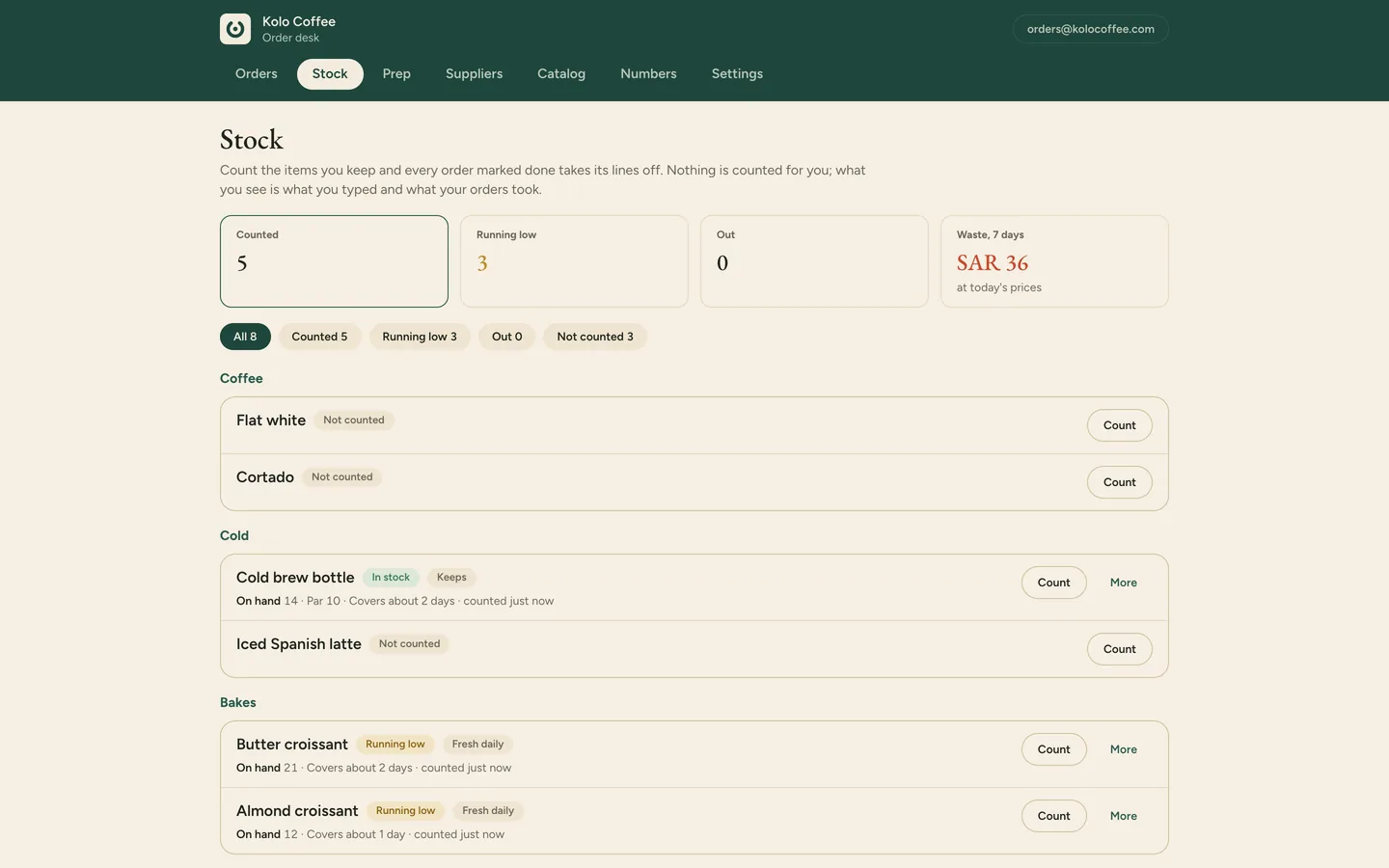
Count what you keep, receive a delivery, log waste with a reason, set a par. The desk shows what is running low and how many days of cover you have, and a counted item that hits zero shows as sold out on your storefront by itself.
For food businesses: from your own sales by weekday, how much of each item to make or bring in tomorrow, less what you still have of the items that keep. It waits until it has enough history.
Change a price, add an item with a photo, switch something to sold out, and your storefront updates straight away.
Mark an item out of stock with one switch and it disappears from your catalog for every customer at once. Switch it back when it is in.
Your suppliers on Marsa show your orders and your balance with each of them, one supplier at a time and never added together. Save the ones you order from by phone and message them from the desk.
03
Delivery days on every confirmation, a plan for what the next van carries, and who is due to reorder before they run out, so fewer deliveries slip and fewer customers go quiet.
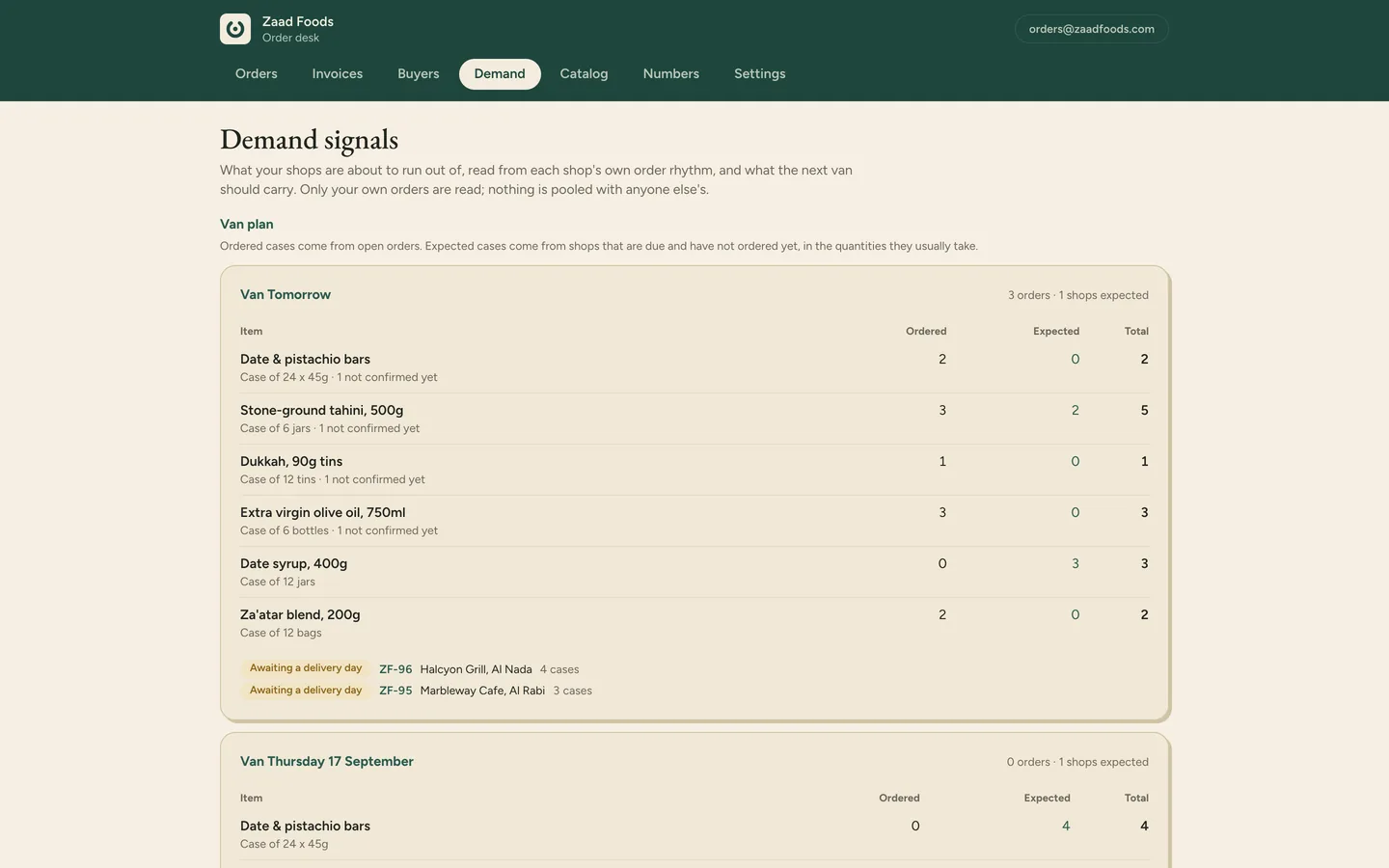
Set the days your van goes out, and every confirmation carries a delivery day your customers can see on their own page.
From each customer's own order rhythm: what the next van should carry, which items a customer is about to need, and which item quietly dropped out of a basket, with a one-tap offer. Each customer's own rhythm only; nothing is pooled.
The desk learns how often each customer usually orders and shows who is due, who has gone quiet and who has stopped, with the sales at stake. One tap opens a nudge with their usual order in it; you send it.
What needs you today, before you open: orders waiting, what is running low, payment requests to follow up, customers due to reorder.
04
A payment request is issued at delivery with the due date and your bank details, what is owed sits by age on your desk, and the follow-up is one tap in the same chat.
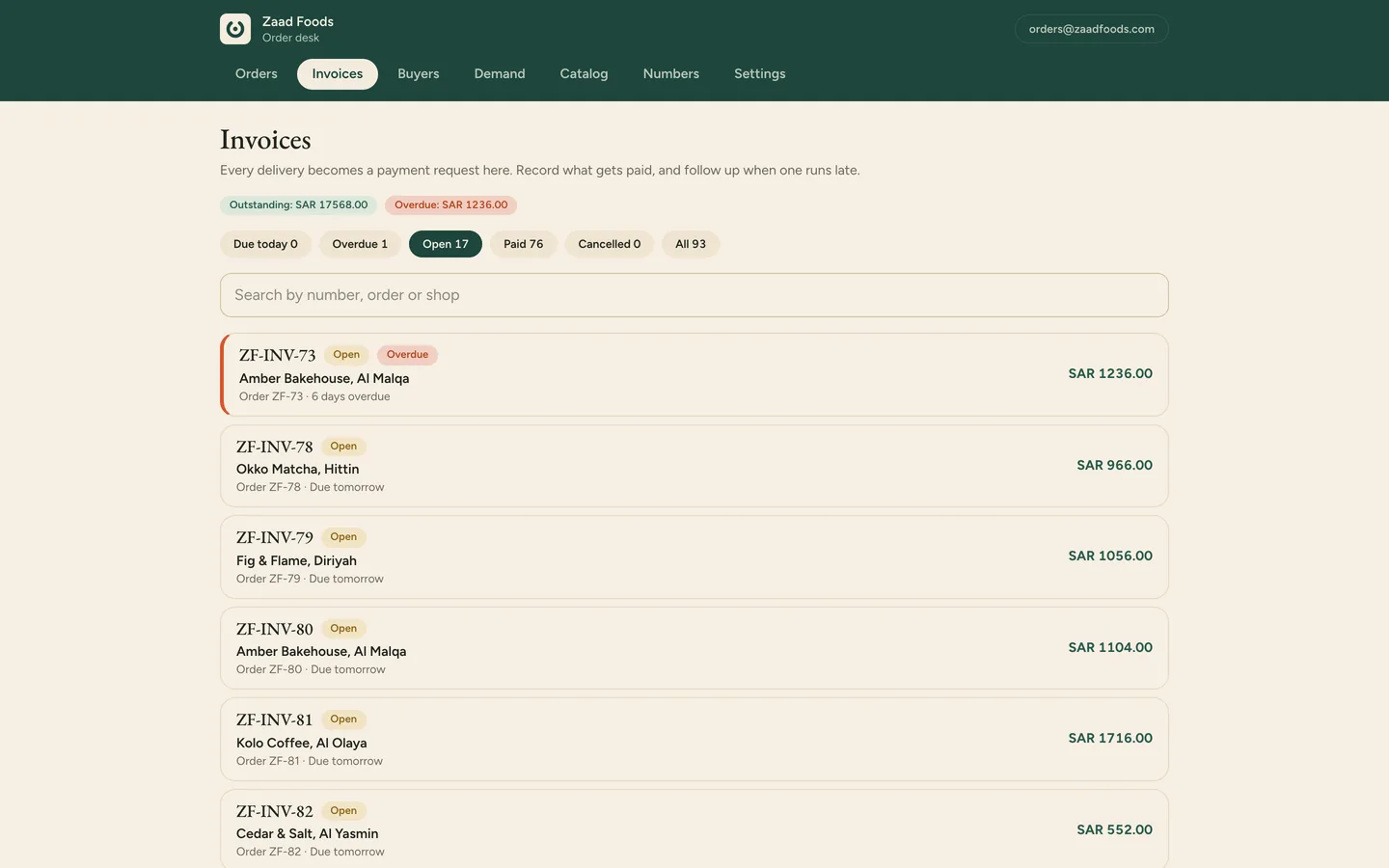
Mark an order delivered, correct any short line, and the desk issues a delivery note with the amount due, the due date and your bank details, as a link for the same WhatsApp chat and as a PDF. Tax invoices stay in your accounting tool.
For anything due or overdue, a pre-written reminder opens in that customer's chat. You send it; nothing goes out on its own. Payments are recorded against the request as they arrive.
A live statement per customer, on its own link and as a PDF, with every delivery note and payment on it.
Each customer gets a page with their orders, delivery day, open payment requests, balance and a one-tap reorder, from a link in your messages. A customer with several suppliers on Marsa sends 'my orders' on WhatsApp and gets one page with all of them, each balance kept separate.
What is owed, bucketed by how late it is, with a bank-ready CSV for your accountant. The Impact panel shows days-to-pay and on-time share against the starting point you set on day one.
Whichever edition, whichever trade.
Orders and sales for today, seven and thirty days, top items and top customers, and the panels of your edition. Nothing is extrapolated and nothing is compared with another business.
An owner and staff on one desk, invite only, each in their own language. Documents and the morning email carry a one-line lead in the other language.
Planned next, not live yet. You pay for what is live today; these arrive as upgrades.
Shops
Orders and replies on your shop's own WhatsApp Business number, instead of the platform line.
Shops
A delivery note and payment request for catering and wholesale orders, the way distributors send them today.
Distributors
Recorded per line on the order and printed on the delivery note, for the trades that need them.
Distributors
Sent on a schedule from your own number, once WhatsApp allows it for business numbers like yours.
Both
Your sales and tax invoices in Qoyod or Wafeq from the same order, with no retyping.
The ones marked with your edition. Shops get the storefront link, forward-to-desk, stock counts, the prep sheet, the suppliers tab and the catalog editor. Distributors get the catalog link, price lists, delivery notes and payment requests, follow-ups, statements, account pages, receivables by age and the van plan. Both get the order desk, the morning email, Numbers and the team.
Not for distributors today. Stock counts are a shops tool: what a shop keeps and sells. A distributor's desk knows what each customer is about to run out of, from their orders, and what the next van should carry.
No. Marsa issues delivery notes, payment requests and statements, and records what was paid. Tax invoices stay in your accounting tool; you note their numbers on the desk.
Not yet. It is on the roadmap for the distributors edition, and the page says so rather than promising a date.
The desk reads, counts and suggests. Every message to a customer is one tap by you, and nothing is sent on its own. The one exception is the morning email to you.
Book a demo and we walk you through the edition that fits your business.